


TL;DR: Offline conversion tracking means telling Google Ads and Meta which of the leads they sent you turned into booked and sold jobs, and what those jobs were worth. Without it, both platforms only see a form fill or a phone call, so their bidding learns to find more form fills and calls, including spam, wrong-area requests and price shoppers. With it, they learn from the jobs that paid your bills. The mechanics fit in one sentence: catch the ad click ID or the customer’s email and phone when the lead comes in, keep them on the lead in your CRM, and send them back when the job status changes.
Three questions to ask about your own setup today:
- Can you see, per campaign, how many leads became booked jobs last month?
- Can you see how much sold revenue each campaign produced?
- Do web forms and phone calls from Google and Meta all land on the same customer record in your CRM, with the ad source still attached?
If any answer is no, your ad platforms are bidding on leads, not jobs.
What changed recently: Google now recommends enhanced conversions for leads over plain click-ID imports and moved API uploads to the Data Manager API on June 15, 2026. Meta discontinued its Offline Conversions API in May 2025. If your tracking was set up before those dates, check it still runs.
Sources: Google Ads Help, GCLID import setup, Meta Conversions API event parameters and Google Ads Help, offline conversion imports, all read October 24, 2026.
What this guide covers: Google Ads campaigns (Search and Performance Max) and Meta ads. Local Services Ads are a separate Google product with their own lead handling and pay-per-lead billing, so they are outside this guide; check separately how your LSA calls and messages reach your CRM.
This is the overview an owner or office manager needs to make the decisions and brief whoever does the setup. Step-by-step setup for each CRM is a bigger job than one article.
Why it matters: cheap leads vs real money
Here is one HVAC company’s Google Ads account for one month, seen two ways. Same three ad groups, same $20,000 of spend. The only difference is whether booked jobs and their value come back from the CRM.
Example numbers for illustration, not client data.
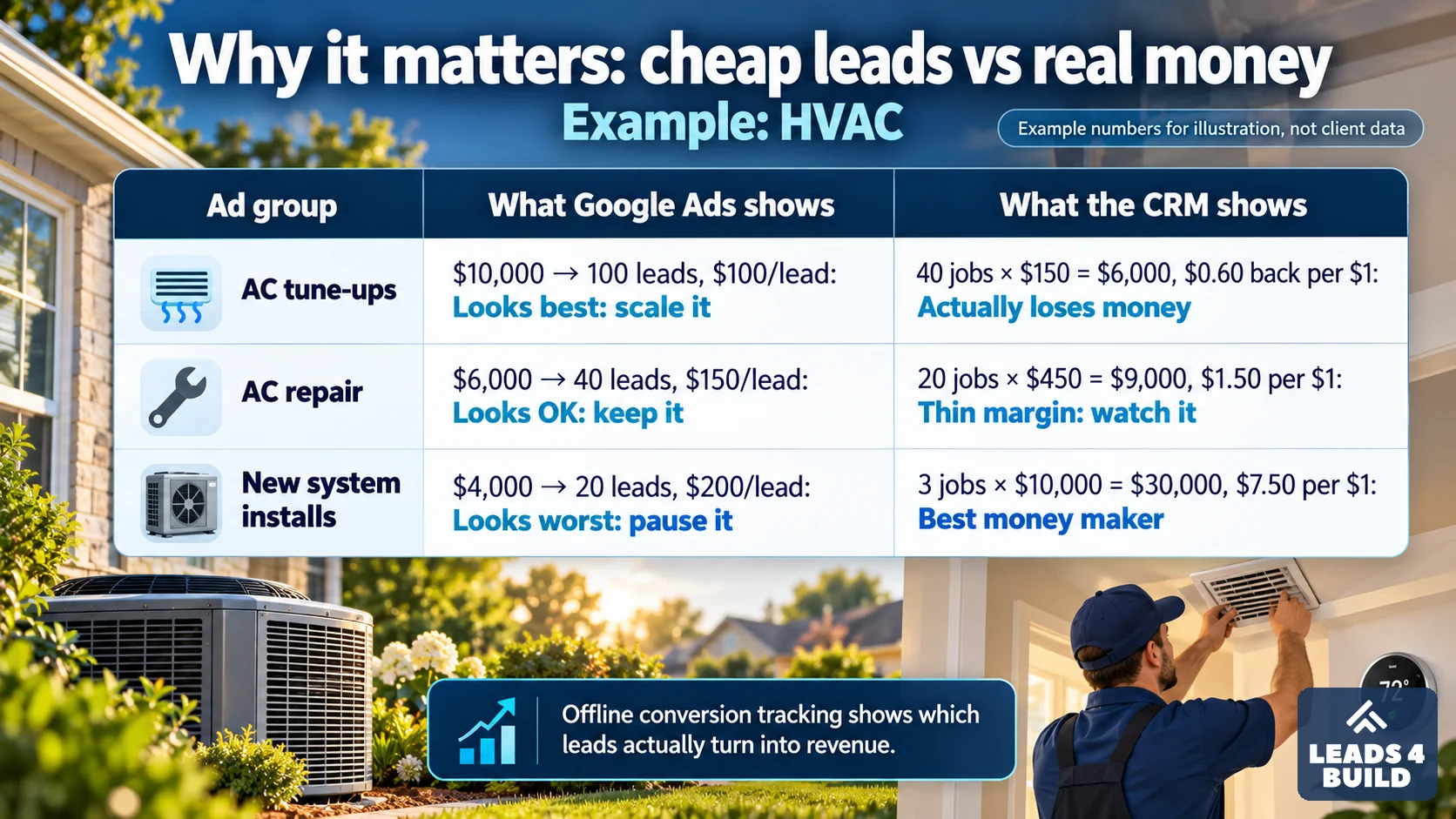
The same numbers, card by card:
What Google Ads shows you (cost per lead)
What your CRM shows after offline import (jobs and revenue)
Judged on cost per lead, the install ad group looks like the one to switch off, and the tune-up ad group looks like the one to feed. The job data says the opposite: 100 cheap leads turned into $6,000 of tune-ups on $10,000 of spend, while 3 installs brought in $30,000 on $4,000. Once you track offline conversions, cost per lead stops being the number that matters, and both you and Google’s bidding can see which ad groups bring in real money.
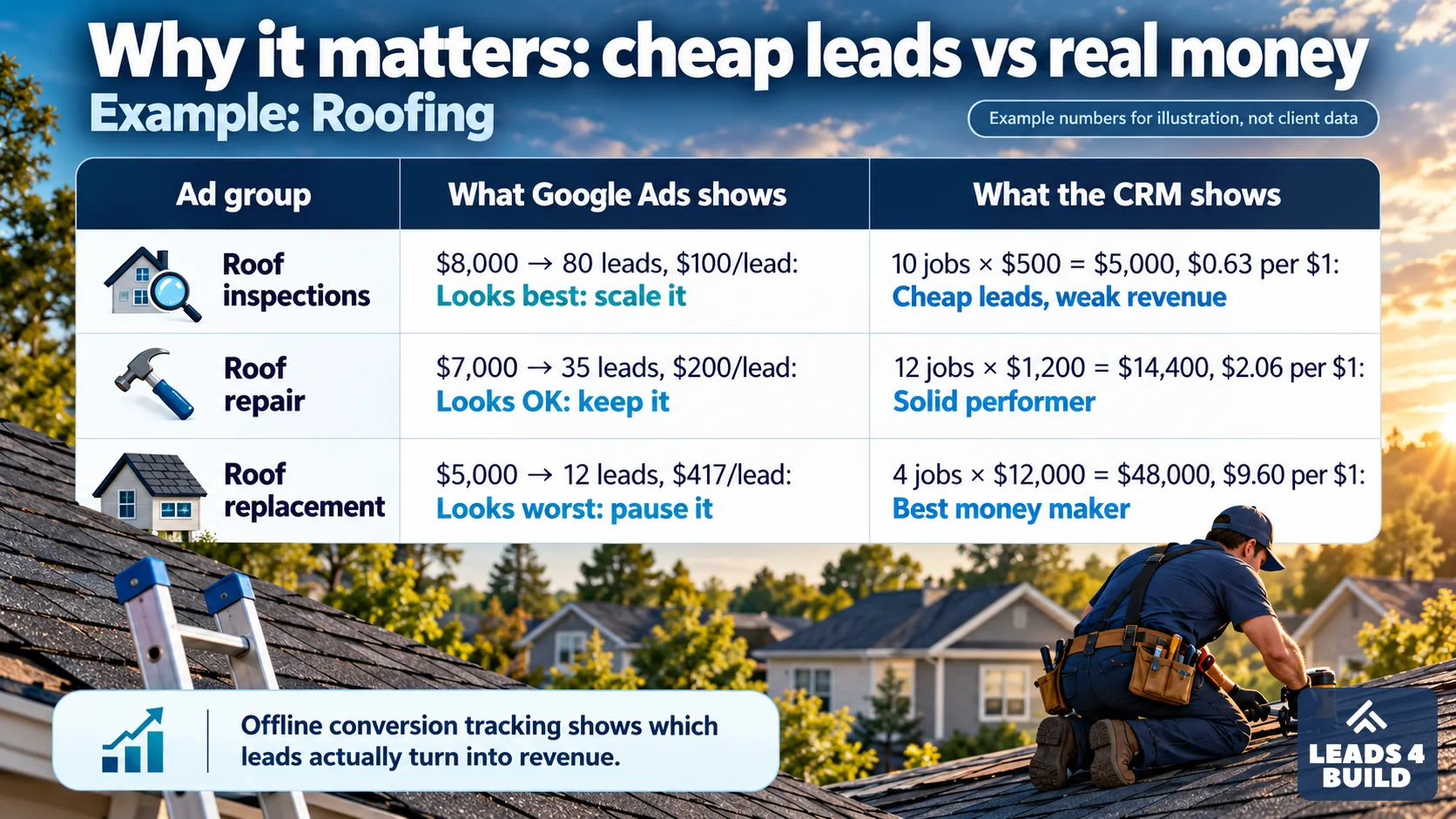
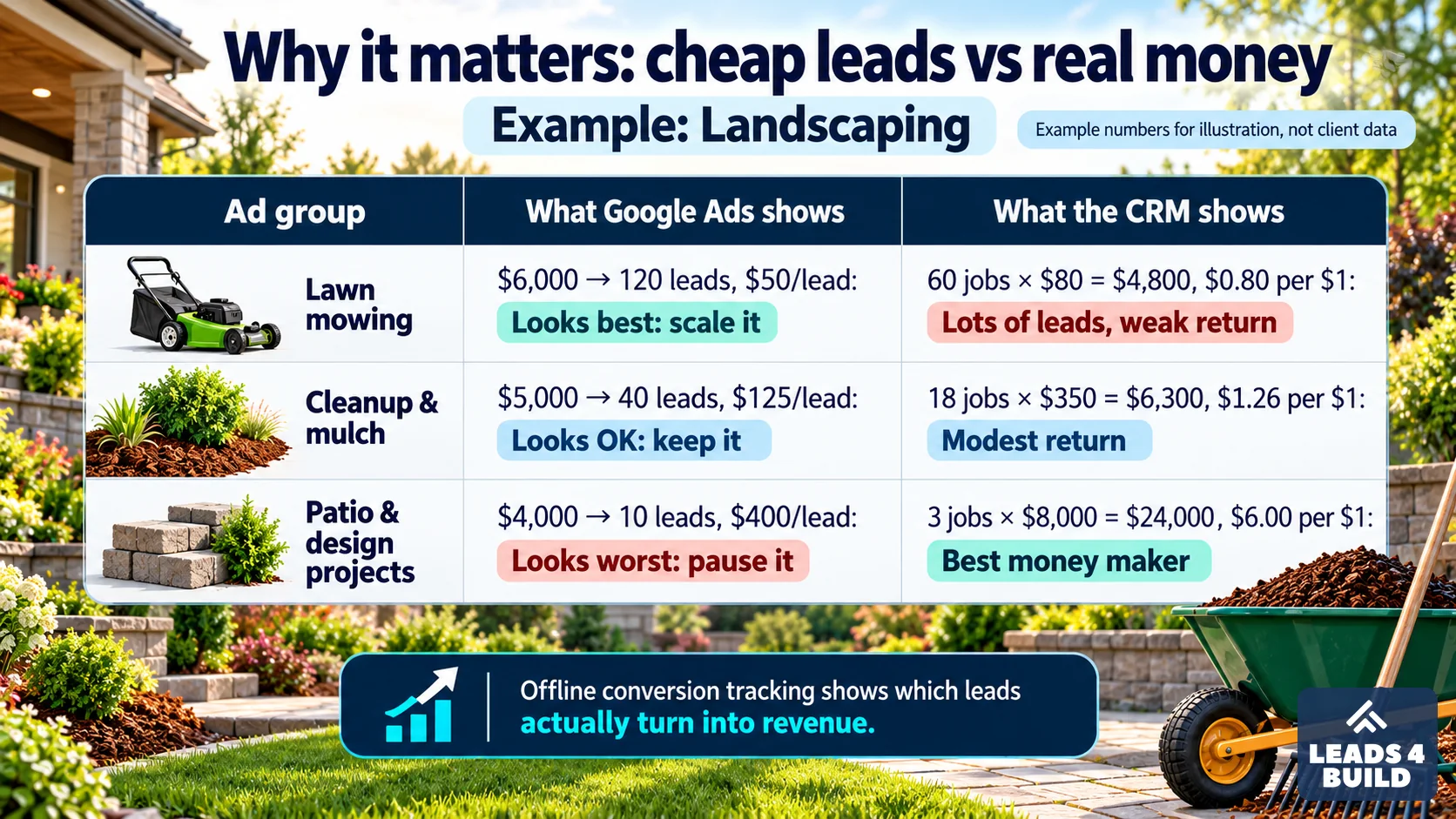
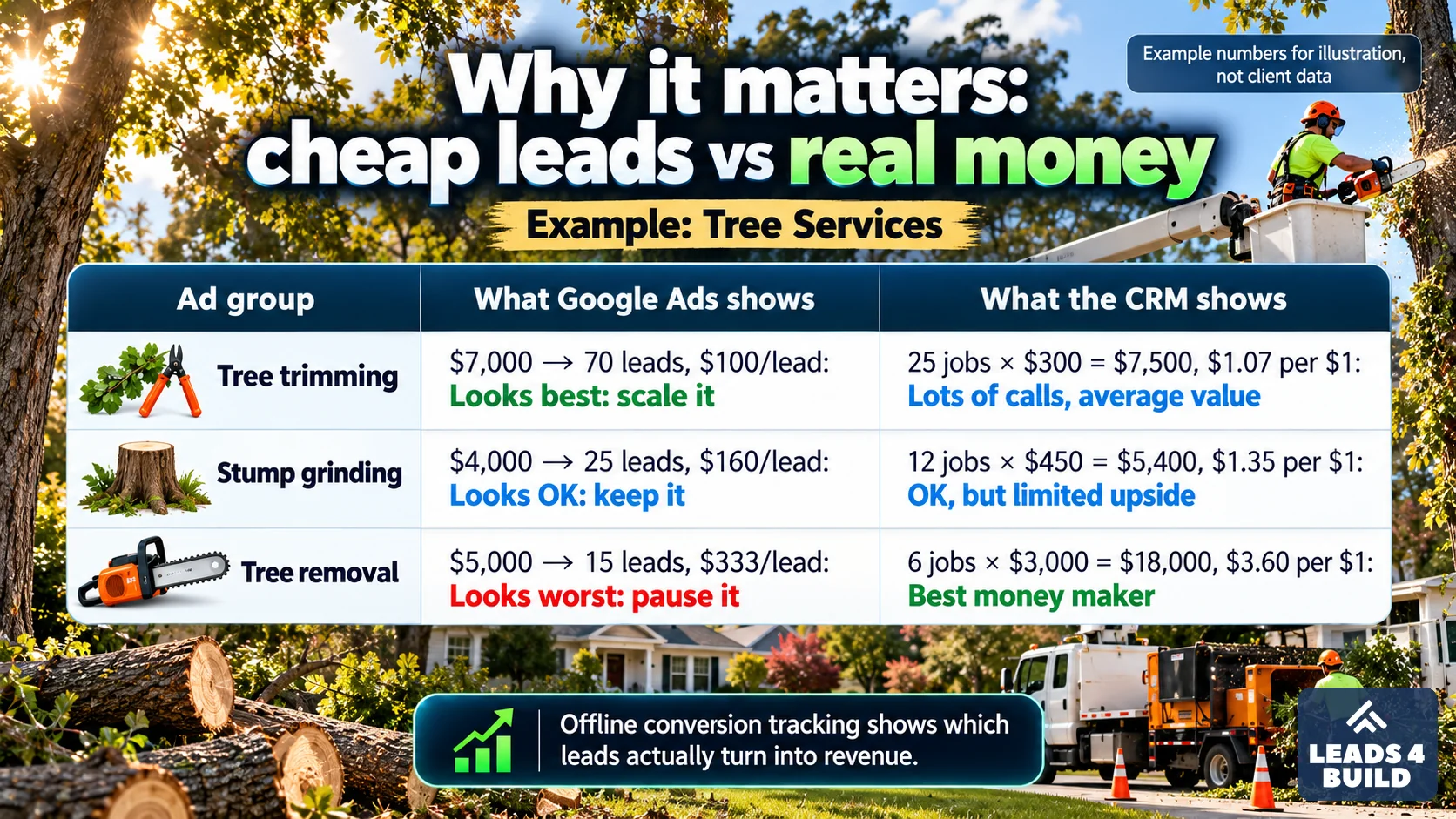
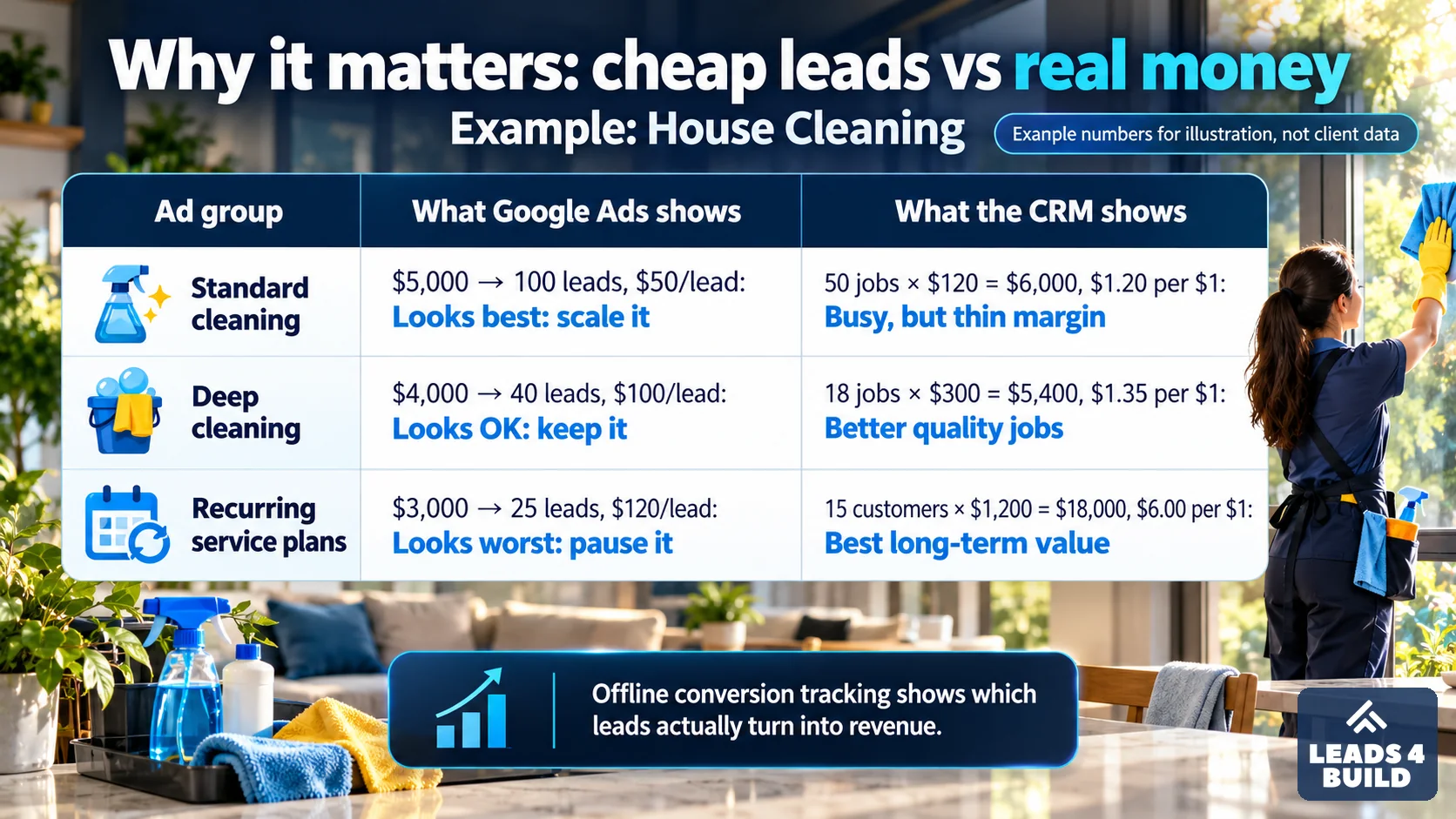
The pattern is not an HVAC quirk. In most trades the cheapest lead is the smallest job, and the lead that looks too expensive is the big one. Four more examples, same idea:
What offline conversion tracking is
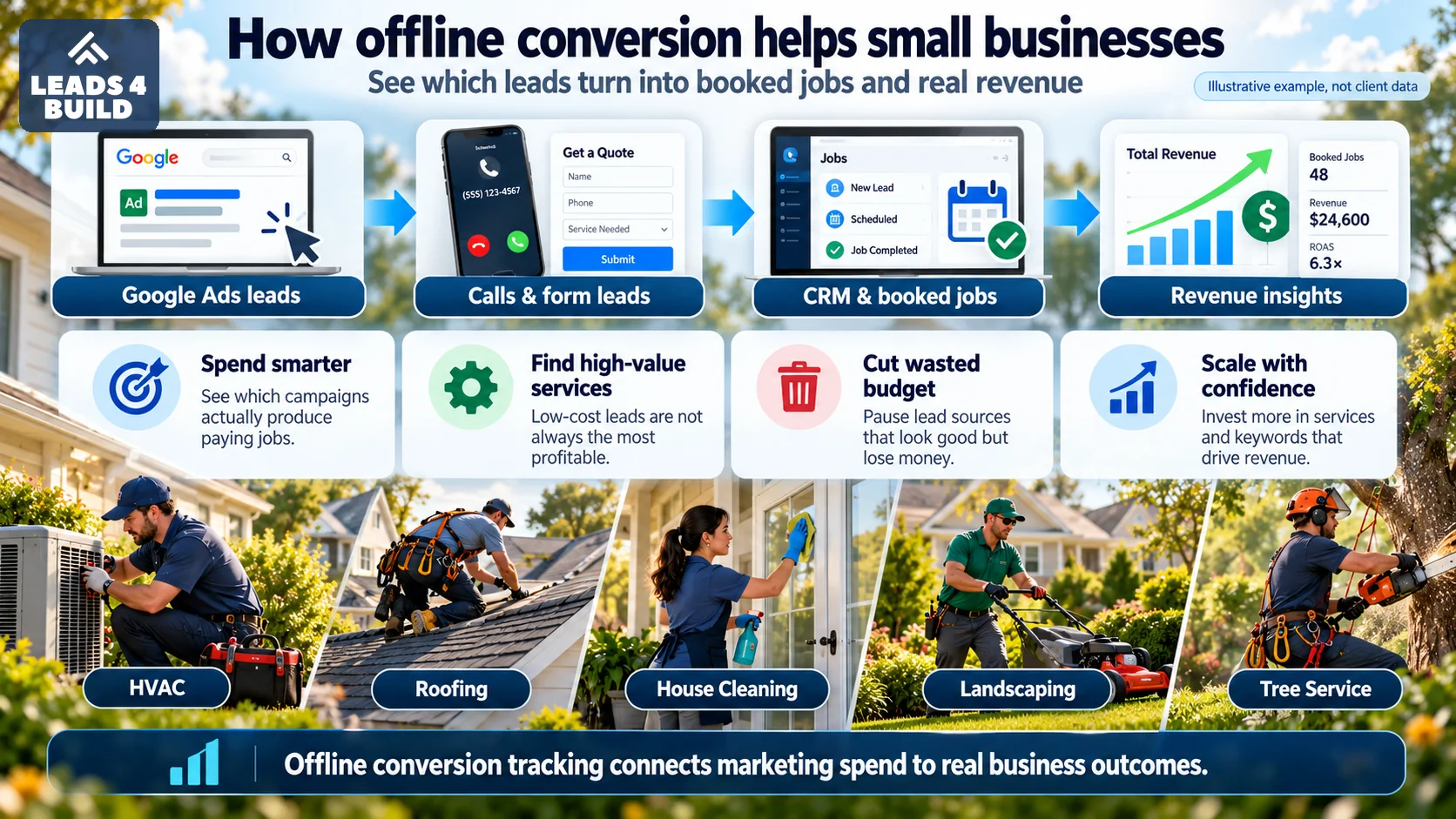
Google’s own definition is short: it lets you “measure what happens in the offline world after your ad results in a click or call to your business” (Google Ads Help). For a contractor, “the offline world” is everything after the lead: the dispatcher books the visit, the tech gives the estimate, the customer signs, the job gets done and paid. None of that happens on your website, so neither Google nor Meta can see it unless you tell them.
The loop has four parts, and every setup, from a spreadsheet to ServiceTitan, does the same four things:
- Catch an identifier when the lead arrives. In plain terms: a Google click ID, a Meta click ID, and the customer’s contact details. For Google Ads the click ID in the landing page address (GCLID, or GBRAID/WBRAID for some iPhone traffic) and, for enhanced conversions, the customer’s email and phone. For Meta it is the click ID stored in the
_fbccookie, the browser ID in_fbp, or the Lead ID from a Facebook or Instagram lead form, plus email and phone. - Keep it on the lead. The identifier has to travel from the web form or call tracking into the customer record in your CRM or field service software. This is where most setups break: if the form drops the click ID, nothing later in the chain can fix it.
- Update the job status. Your team already does this when they book, sell or close a job. Each status change becomes a conversion event.
- Send it back. A connector, a scheduled file, a Zapier step or an API call uploads “this click turned into a booked job worth this much, at this time.”
Why booked jobs beat form fills as the signal
Smart Bidding in Google Ads and conversion-optimized campaigns in Meta look for more people like the ones who triggered your conversion. Count every form fill, and the system gets very good at finding people who fill in forms. For a home service business, that is a weak instruction for three reasons:
- Many leads are not jobs. A form fill or a 40-second call counts the same whether it came from a homeowner with a broken AC, a solicitor, someone two counties outside your service area, or a renter asking the price of a repair the landlord will never approve.
- Jobs are not the same size. A drain clearing and a full repipe, a tune-up and a system replacement, a gutter cleaning and a new roof all show up as one “lead”. Google’s help center says “Conversion values help you measure and optimize the true business impact of your ad campaigns more accurately” (Google, conversion values). Value-based strategies such as Maximize conversion value and Target ROAS only work when the value is real.
- Your best channel can look like your worst. A campaign with fewer, larger jobs looks expensive on cost per lead and cheap on revenue per dollar. Without job data, the cheap-lead campaign wins the budget.
The platforms have a built-in way to act on this. In Google Ads, a primary conversion action is “reported in the ‘Conversions’ column in your reports and used for bidding”, while a secondary one is “for observation only” (Google, primary and secondary actions). The usual pattern: keep form fills and calls as secondary so you still see them, and make booked or sold jobs primary once enough of them flow back.
Do not flip that switch on day one. Wait until the uploaded jobs match your CRM counts week after week and each campaign sends a steady stream of them. A shop that sells a handful of replacements a month per campaign is usually better off bidding on booked estimates and reporting sold revenue alongside.
For you: if your agency reports cost per lead but cannot tell you how many of those leads became booked jobs, you are paying for a number the ad platform optimizes and your business does not. The same goes for any new channel you test, such as ChatGPT Ads for home services.
Which job stages to send back
You do not need to send every status. Pick the stages that mean money, and give each its own conversion action so you can see the drop-off between them.
| Stage in your CRM | What it means | How to use it in the ad platform | Value to send |
|---|---|---|---|
| New lead (form or call) | Someone contacted you | Secondary. Watch it, do not bid on it once job data flows | None or a small flat value |
| Qualified | In your service area, a service you offer, a real person | Secondary, or primary while job volume is still low | Flat value |
| Booked | An appointment or estimate visit is on the calendar | Primary for most service and repair businesses | Average ticket, or a predicted value |
| Sold | Estimate approved, contract signed | Primary for replacement, install and remodel work with long sales cycles | The sold amount |
| Completed or paid | Job done, invoice paid | Primary or secondary, depending on how long jobs take | Actual revenue |
The timing question decides a lot. Google only imports a conversion if it happens within a set time of the click (more on the limits below), and the click-through conversion window you set on the action defaults to 30 days, adjustable “anywhere from 1 to 90 days, depending on the source of conversions” (Google, conversion windows). A furnace repair is booked and paid in a day. A kitchen remodel can take months from first call to signed contract, so the remodeler often has to bid on “booked consultation” and treat “sold” as a report.
Google Ads: your options for sending jobs back
Google gives you three ways to tell it about a job, and they can run together. Here is what each is called today.
| Method | How Google matches the job to the ad | Best for | Limits to know |
|---|---|---|---|
| Enhanced conversions for leads (Google’s recommended option) | Hashed email and phone from your form, plus the click ID when you have it | Web form leads; any business starting fresh | Form must collect email or phone; you accept Google’s customer data terms |
| Offline conversion import with GCLID (Google now calls it legacy) | The click ID saved with the lead | Older setups and CRMs that already store the GCLID | Click ID is case sensitive; 14 or 90 day window by data source |
| Phone call conversion import | Caller’s phone number and call start time | Calls through a Google forwarding number on your ads or site | Needs call assets or call-only ads; uploads cannot be removed |
Enhanced conversions for leads
Google describes it as “an upgraded version of offline conversion import that uses user-provided data” (Google, enhanced conversions for leads). The Google tag hashes the email or phone from your form; when the job is booked you upload the same details, and Google matches them to signed-in Google accounts. Google’s advice for anyone not already using click-ID imports: “we recommend starting with enhanced conversions for leads instead” (Google Ads Help).
The setting is simpler than it used to be: “Enhanced conversions for web and leads are now combined into a single on/off setting” (Google). Keep capturing the click ID anyway. Google says “It’s recommended you continue to send the GCLID to maximize measurement and performance benefits”, and it is required if no tag collects the customer data.
Offline conversion import with the click ID
This is the original method. Auto-tagging adds a GCLID to every ad click, your form saves it in a hidden field, your CRM keeps it, and you send it back with the job. Some iPhone traffic carries a GBRAID or WBRAID instead (Google Ads API docs), so capture all three.
The time limit depends on how the data reaches Google. You need “a click-to-conversion cycle that is less than 14 days or 90 days, depending on the data source” (Google). The 90 days apply to file-based sources: Google Sheets, SFTP, HTTP, Google Cloud Storage and Amazon S3. The 14 days apply to Salesforce, HubSpot and database sources such as BigQuery. If sold jobs land 30 or 60 days after the click, pick a 90-day source.
Phone call conversion import
Most contractor leads are phone calls, and a call has no form to carry a click ID. Google’s answer is a separate import: you upload the caller’s number and call start time for calls that became jobs. It needs a call asset or call-only ad using a Google forwarding number, plus the Google tag’s phone snippet for website calls (Google, import phone call conversions). The other route is call tracking software with dynamic numbers that stores the click ID for each caller, which is how ServiceTitan does it: its Google Ads integration “is not complete until Google Analytics and Dynamic Call Tracking using DNI are also configured” (ServiceTitan Help). DNI, dynamic number insertion, shows each visitor a different tracking number so the call can be tied to the click.
If a past agency set up call tracking for you, the weak point is usually the handoff, not the tracking itself. Check four links in the chain: the tracking number knows which campaign and click the caller came from; that source and click ID reach the customer record in your CRM; your CSR marks the call as booked (or not) in the CRM, not only in the call tracking tool; and the booked job, not the call, is what gets sent back to Google. A call recording or a long call is not a booked job. Once a month, compare booked calls in the call tracking tool with booked jobs in the CRM by source; a big gap means the handoff is broken.
How the data gets to Google
- Data Manager, inside Google Ads, connects to Google Sheets, file drops, HubSpot, Salesforce and databases. Google calls it “The fastest and easiest way to set up or upgrade to enhanced conversions for leads.” For HubSpot, “all conditions must use the Lifecycle Stage field” (Google, HubSpot connection), so your HubSpot stages decide what counts.
- Built-in CRM integrations such as ServiceTitan’s, or Zapier, which Google lists as a supported route.
- The API. “Starting June 15, 2026, offline conversions import and enhanced conversions for leads uploads will be migrated to the Data Manager API and blocked in the Google Ads API” (Google). If a developer or an older plugin built your upload, ask which API it uses now.
Meta: the Conversions API is now the offline route
If your tracking still sends to an “offline event set”, it stopped working. Meta’s changelog says “The Offline Conversions API will be discontinued in May 2025” and recommends the Conversions API instead (Meta for Developers). Meta’s current guide calls the Conversions API its “recommended integration method for sending offline and physical store events” (Meta, offline events).
The Conversions API (often shortened to CAPI) is a server-to-server connection: your CRM or a connector sends events straight to Meta instead of relying on the browser pixel. Each event says what happened, when, how (a field called action_source, with values such as phone_call and website) and who, using the click ID and hashed email and phone (Meta, event parameters).
The 7-day rule
This is the biggest practical difference from Google. Meta says “The event_time can be up to 7 days before you send an event”, and if any event in a request is older than that, the whole request is rejected (Meta). So a monthly spreadsheet upload does not work for Meta. Your booked and sold jobs need to go out at least daily, which in practice means a connector, not a person.
Two kinds of Meta leads, two setups
Leads from Meta lead forms (Instant Forms). Meta’s Conversions API for CRM is built for this. Store the Meta Lead ID with the lead and send stage changes from your CRM. The requirements are specific: “Generate at least 200 leads per month”, the stage you optimize for should convert at between 1% and 40% of leads and happen within 28 days, and you upload “at least once per day” (Meta, Conversions API for CRM). If you meet them, you can use the Conversion Leads performance goal, which Meta says “is currently only compatible with” Facebook and Instagram lead forms. Many small contractors fall short of 200 Meta leads a month; the stages are still worth sending for reporting.
Leads from your website. When someone clicks a Meta ad and fills in your own form, the click ID sits in the _fbc browser cookie on your site (Meta, customer information parameters). Save it with the lead, together with email and phone; Meta says “Phone numbers must include a country code to be used for matching”.
HubSpot users can send “CRM lifecycle stage changes or form submissions” to Meta through its built-in Conversions API sync, with the limit that “Submissions from non-HubSpot forms cannot be synced with Meta” (HubSpot Knowledge Base).
Google Ads vs Meta offline conversions, side by side
| Google Ads | Meta | |
|---|---|---|
| Current method name | Enhanced conversions for leads (recommended); offline conversion import with GCLID (legacy) | Conversions API; Conversions API for CRM for lead form leads |
| Retired method | Google Ads API uploads moved to the Data Manager API on June 15, 2026 | Offline Conversions API, discontinued May 2025 |
| Click identifier | GCLID, plus GBRAID and WBRAID for some iOS traffic | _fbc cookie (from fbclid); Lead ID for lead forms |
| Customer data | Hashed email and phone | Hashed email and phone (SHA-256), phone with country code |
| How late you can send | 14 or 90 days after the click, by data source | Event must be no more than 7 days old when sent |
| Phone calls | Separate call conversion import, or call tracking that stores the GCLID | Send the job with action_source set to phone_call |
What your CRM needs before any of this works
Creating conversion actions in Google Ads and Meta is the quick part. The CRM side is where projects stall, because it touches your website forms, your phones, duplicate customers and how your office marks job statuses every day. Before anyone builds an upload, check these, and agree who owns each one:
| Your CRM or field service software must… | Why | Who owns it |
|---|---|---|
| Save GCLID, GBRAID, WBRAID and the Meta click ID from every web form in their own fields | No click ID or customer data, no match. Hidden form fields do this; the CRM needs a place to keep them | Agency or developer |
| Tie calls to the ad that produced them | Most contractor leads are calls. Dynamic call tracking numbers or Google forwarding numbers do this | Agency or developer |
| Keep email and a full phone number on the customer record | Enhanced conversions and Meta match on these. Phone needs a country code for Meta | Office manager and CSRs |
| Have clear, consistent job stages with dates | Each upload needs the time the stage was reached, not the day someone tidied the records | Office manager |
| Record a job value | Booked value, sold amount or invoice total: whatever your team fills in reliably | Owner decides, office enters |
| Keep one record per customer | Duplicate records split the click ID from the job, and the conversion is lost | Office manager |
| Have someone who checks it | Uploads fail quietly. Someone should look at the diagnostics in both platforms every week | Agency, reporting to the owner |
What the common contractor tools offer
- ServiceTitan has a built-in Google Ads integration that “is part of Marketing and is included in your ServiceTitan Max subscription”. It sends booked jobs using the GCLID. Revenue from completed jobs goes through Ads Optimizer, which ServiceTitan describes as a “Marketing Pro tool that auto-tunes Google Ads spend based on real revenue and team capacity” (ServiceTitan Help). Check which tier you are on before you plan around it. Questions to put to ServiceTitan and your agency: is the Google Ads integration switched on, and is Ads Optimizer; which call tracking provides the dynamic numbers; can you see the campaign on each booked job; which job statuses trigger an upload; and are any jobs counted twice, once from the web visit and once from the call.
- HubSpot connects to Google Ads through Data Manager, using lifecycle stages to decide which contacts count (Google), and to Meta through its own Conversions API sync (HubSpot). If your sales stages live in deals rather than lifecycle stages, plan that mapping first.
- Jobber: we did not find a native Jobber connector for Google Ads offline conversions in Jobber’s help center. Zapier publishes templates for it, triggered by new requests, sent or approved quotes, new jobs, closed jobs and invoices (Zapier). A Zap only moves data. It does not create attribution: you still need your website form to capture the click ID, a custom field in Jobber to hold it, consistent lead sources, and a separate process for phone leads. If tracking is the main reason you are weighing a move to ServiceTitan, compare the full cost of that move with the cost of building these pieces around Jobber.
Comparing software? Our roundup of home service marketing tools covers the CRM, field service and call tracking options most contractors use, and our CRM and marketing automation page covers cleanup work.
Privacy and consent rules to follow
You are sending customer details to Google and Meta, so a few rules apply even to a one-truck shop:
- Disclose it. Google’s customer data policies say “Ensure that you disclose to customers that you share their information with third-parties”, and “Obtain customer consent for such third-party sharing and use where legally required” (Google customer data policies). In practice: your privacy policy should say you share contact details with advertising platforms for measurement.
- Use approved channels. Google: “You can only use Google’s approved API, tagging implementation or interface to upload customer information.” If an agency or contractor uploads for you, the same policy says you must “ensure in writing” that they follow these rules.
- Hash personal data. Both platforms take email and phone hashed, not in plain text; most connectors do this for you.
- Consent signals. Google’s EU user consent policy covers “end users in the European Economic Area, the UK and Switzerland” (Google). Most US contractors have few such visitors, but Google’s API docs still recommend filling in the consent field on every uploaded conversion (Google Ads API). Some US states have their own privacy laws too.
This is not legal advice, just the list to raise before you switch it on.
Mistakes that quietly break offline conversion tracking
| What happens | Why it breaks | The fix |
|---|---|---|
| The website form or a booking widget drops the click ID | The lead reaches the CRM without the GCLID or Meta click ID, so it can never be matched | Test a real ad click to a submitted form and check the CRM record has the ID |
| The GCLID gets edited, lowercased or cut short | Google: “The GCLID is case sensitive” | Store it in a plain text field and never touch it by hand |
| Form fills and booked jobs are both primary | One customer is counted twice and bidding chases the cheaper action | Make leads secondary once booked jobs flow |
| Meta jobs are uploaded weekly or monthly | Events older than 7 days get the whole request rejected | Send daily through a connector |
| Every call counts as a lead | Hang-ups, existing customers and solicitors teach the platform the wrong thing | Send only calls your team marks as booked |
| Old setup still points at Meta’s Offline Conversions API or an old Google API path | Both were retired; uploads fail with no visible warning in your CRM | Check diagnostics in Google Ads and Meta Events Manager |
Where to start this month
Do these in order. Changing bidding before the data is clean makes things worse, not better.
Measure the gap you have now. Pull last month’s leads by source from your ad reports, and booked and sold jobs by source from your CRM. Where the two do not line up, or the CRM shows no source at all, that is where tracking breaks.
Decide what a job is. Write down the stage you want the platforms to bid on (booked, sold or completed) and where its value comes from. Make the decision with whoever runs the office, because they set the statuses.
Fix capture on the website. Turn on Google auto-tagging, add hidden fields for GCLID, GBRAID, WBRAID and the Meta click ID, and make sure email and phone are on every form. Then turn on enhanced conversions in Google Ads.
Fix capture on the phones. Use Google forwarding numbers on call assets, or call tracking with dynamic numbers that passes the click ID into your CRM.
Create the conversion actions in Google Ads (one per stage) and in Meta Events Manager, with the new ones set as secondary at first.
Connect the upload. A built-in integration if your CRM has one, Data Manager or Zapier if it does not. Daily for Meta, at least weekly for Google.
Check the match before you switch bidding. When uploaded jobs line up with your CRM for several weeks running, make booked or sold jobs primary and leads secondary. Keep lead tracking visible, and expect bidding to need time to adjust.
If you would rather hand this off, it is part of our Google Ads management for contractors and Facebook and Instagram ads work, where we report on booked jobs.
The bottom line
The ad platforms bid on whatever you count as a conversion, so what to count is your decision, not your agency’s. The work is mostly on your side: catch the click ID and the customer’s contact details on every form and call, keep them on the lead in your CRM, and send status changes back on time, within 7 days for Meta and inside Google’s 14 or 90 day window. If your setup is more than a year old, check it against the 2025 and 2026 changes before trusting the numbers it reports.
About the sources: every rule and limit above links to the platform page it comes from. The main ones are Google’s GCLID import setup, Google’s enhanced conversions for leads guide, Meta’s Conversions API event parameters and Meta’s Conversions API for CRM. CRM details come from each vendor’s own help pages. All pages read October 24, 2026; both platforms change these features often, so check the linked page before you build.